

Last Updated 3/16/2026
Small businesses working to make their websites more accessible to people with disabilities may be eligible for significant tax benefits through the IRS Disabled Access Credit. This opportunity can significantly reduce the cost of digital accessibility compliance and should be explored by any U.S. small business meeting the criteria.
Disclaimer
As with all things tax-related, please seek the advice of your CPA or tax professional before filing for the Disabled Access Credit. Nothing in this post should be considered financial or tax advice.
What Is the Disabled Access Credit?
The Disabled Access Credit is a non-refundable tax credit available to eligible small businesses that incur expenses to provide access to persons with disabilities. Established Revenue Reconciliation Act of 1990 in relationship to the Americans with Disabilities Act (ADA) of 1990, this credit is claimed using IRS Form 8826.
Tax Credit vs. Tax Deduction — Why the Distinction Matters
A tax deduction reduces taxable income, while a tax credit directly reduces the taxes owed dollar-for-dollar, making the credit significantly more valuable (a significant distinction).
Here is the key difference: a tax deduction reduces the income on which your taxes are calculated, while a tax credit reduces your actual tax bill dollar-for-dollar. For example, a $5,000 tax deduction might save you roughly $1,000 to $1,500 depending on your tax bracket, but a $5,000 tax credit saves you the full $5,000 directly off the taxes you owe (for more see: IRS: Tax Credits and Deductions). That’s what makes the Disabled Access Credit so valuable: it goes belond just lowering your taxable income, and instead reduces the check you write to the IRS directly. When you compare this to simply expensing accessibility work as a regular business deduction, the credit delivers significantly more savings per dollar spent.
How Much Is the Tax Credit?
For eligible small businesses, the credit equals 50% of eligible accessibility expenditures that exceed $250 but do not exceed $10,250 for a given tax year. This means the maximum credit available is $5,000 per year ($10,000 × 50%).
For example, let’s say a small business hires an accessibility consultant to undertake an accessibility audit of their website and remediation of all its reported accessibility issues. The final cost was $5,000. The business would be allowed a tax credit of (($5,000 – $250) / 2) or $2,375 which is just under 50% of the total cost of the project. Half off is pretty sweet.
Note:
This tax credit can be taken every year that suitable expenses are incurred. So, if your accessibility project falls over two tax years, or if you pay annual costs for tools which help your staff maintain the accessibility of your website and related documents, a tax credit is available if those expenses exceed $250/yr.
| Expense | Tax Credit / Cost Savings | Final Cost |
|---|---|---|
| $500 | $125 | $375 |
| $1,000 | $375 | $625 |
| $2,500 | $1,175 | $1,375 |
| $5,000 | $2,375 | $2,625 |
| $10,000 | $4,875 | $5,125 |
Who Qualifies as an Eligible Small Business?
To qualify for the Disabled Access Credit, a business must:
- Have earned $1 million or less in gross receipts for the preceding tax year, OR
- Had no more than 30 full-time employees during the preceding tax year (as per Form 8826, “An employee is considered full time if employed at least 30 hours per week for 20 or more calendar weeks in the tax year”)
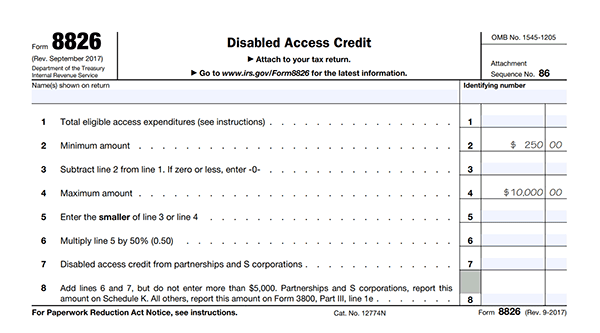
How to Claim the Credit Using Form 8826
To claim the Disabled Access Credit:
- Complete IRS Form 8826, available at https://www.irs.gov/forms-pubs/about-form-8826
- Calculate your eligible accessibility expenditures for the tax year
- Subtract $250 from this amount
- Multiply the result by 50% and take the lesser of that result or $5,000
- Include the completed Form 8826 with your business tax return
Here’s a walkthrough of the form by Certified Financial Planner (CFP) Forrest Baumhover:
Read Video Transcription
IRS Form 8826: Disabled Access Credit
Courtesy of Forrest Baumhover
In this video, we’ll be going over IRS Form 8826, Disabled Access Credit. This is a tax credit that’s generally available to small businesses that spend money on providing access improvements for certain people in compliance with the Americans with Disabilities Act.
This can be a wide-ranging set of expenditures — anything from providing interpretive services for deaf and hard-of-hearing people, to providing visual access for visually impaired people, to providing any kind of structural access improvements to your workspace or place of retail. There’s a lot you can include under this umbrella, but there are a couple of key things to remember.
I’ll take a pause here and point out that this form is fairly straightforward. There are only eight lines, and we will go through them. The devil in the details really is on the back, where we have to closely define what an eligible small business is, what eligible access expenditures are, and what a disability is. We’ll go through that for a few minutes and then circle back and walk through this form step by step.
Eligible Small Business
For purposes of taking this tax credit, an eligible small business is any business or person that had gross receipts for the preceding tax year that did not exceed one million dollars, or the business had no more than 30 full-time employees during the preceding tax year, and that business elects — by filing Form 8826 — to claim the Disabled Access Credit for the tax year.
To further clarify the definition: gross receipts are reduced by returns and allowances made during the tax year. Employees are considered full-time if they are employed at least 30 hours per week for 20 or more calendar weeks in the tax year. All members of the same control group and all persons under common control are generally considered to be one person. Business owners that need further clarification can find that in the form instructions.
Eligible Access Expenditures
The definition of eligible access expenditures is a little more broad. These are expenditures incurred by the eligible business to comply with Public Law 101-336 — the Americans with Disabilities Act of 1990, as in effect on November 5, 1990.
Examples of eligible access expenditures can include amounts paid or incurred to:
- Remove barriers that prevent a business from being accessible to or usable by individuals with disabilities.
- Provide qualified interpreters or other methods of making audio material available to deaf and hard-of-hearing individuals. (The “hearing impaired” term is straight from the form instructions.)
- Provide qualified readers, taped texts, and other methods of making visual materials available to individuals with visual impairments.
- Acquire and modify equipment or devices for individuals with disabilities.
All of these eligible expenditures do not include expenditures in category one — removing barriers — for any facility that was first placed into service after November 5, 1990. Qualified expenditures would be retrofitting an older building built before November 5, 1990 to provide compliance with the ADA.
Definition of Disability
The technical definition of an individual with a disability, according to the IRS, is an individual with a mental or physical impairment that substantially limits one or more major life activities, a record of having such an impairment, or being regarded as having such an impairment.
Walking Through the Form
With that said, let’s go through this form. We’ll imagine that our example taxpayer, John Smith, is operating his business. Based on the guidance we just discussed, we’ll imagine that Mr. Smith spent twelve thousand dollars during the tax year on eligible expenditures.
We’ll put that amount in Line 2. It is incumbent on every taxpayer to keep accurate records and to define for themselves what eligible access expenditures are. If you’re not clear on what would constitute an eligible access expenditure, you should talk with your accountant.
There is a floor for this: you must spend at least $250 in a given tax year before your first dollar of credit is applied to lower your tax bill. We’re going to subtract that $250 from this amount, and we’re left with $11,750. We’ll put that in Line 3.
Then we’ll compare that to the amount in Line 4, because the maximum amount you can claim for the tax credit is $10,000 after the $250 floor. We’re going to enter $10,000 because that is the most we can claim.
Then we multiply that $10,000 by 50 percent. This tax credit is 50 percent — for every two dollars you spend, you receive a one-dollar tax credit. A tax credit is a one-for-one reduction in your tax bill, as opposed to a tax deduction.
It is important to note that if you had an expenditure you’re claiming a tax credit for under any other program or type of tax credit, you cannot then claim that same expense under the Disabled Access Credit. That would be considered double dipping, which the IRS generally frowns upon. If you spent $10,000 to retrofit a building that qualifies under a different tax credit, but then you spend a separate $10,000 on structural improvements specifically for enhanced ADA access, that would be fine. But if you spent $10,000 that qualifies under another tax credit and then tried to also claim it as a Disabled Access Credit, you would not be able to do that.
Lines 7 and 8
Line 7 is for individuals that might be reporting Disabled Access Credit from partnerships and S corporations. In our instance, Acme Enterprises is a business, so the only Access Credit they would have is what they spent — or if they were an owner in a partnership or S corporation. For this example, they are not.
However, if you are an individual filing this tax return and your only tax credit happens to be from a partnership or S corporation — meaning you did not personally spend any money that goes on Form 8826 — then you can claim that credit directly on Form 3800. We’ll talk about where on Form 3800 you would claim that credit under Line 8.
In Line 8, you will add Lines 6 and 7, but not an amount that exceeds $5,000. That’s the maximum amount of this credit you can claim in a given tax year.
For partnerships and S corporations, you would report this amount on Schedule K. All other taxpayers report this amount on IRS Form 3800, the General Business Credit, Part III, Line 1e.
Again, if you did not have to calculate the credit in Lines 1 through 6 and the only Disabled Access Credit is from your K-1 as reported from your partnership or S corporation, then you don’t need to complete this form. You can simply take that number from the K-1 and report it on Form 3800 directly.
Additional Resources
If you have any more specific concerns or points of clarification, there are instructions on the back of the form. You can also refer to the ADA — there are plenty of resources that help people understand what types of expenditures have been claimed for this tax credit in the past. Simply go to ada.gov. There are a lot of resources there for business owners looking for ways to make access improvements based on the types of clients, customers, or employees they are trying to accommodate.
That’s all we have for this video. If you want more detail about how to complete this form, go to teachmepersonalfinance.com. From there, you can type in “IRS Form 8826” in the search bar and find the article written specifically on this form. If you like our articles, please subscribe to our newsletter. If you like our videos and want to continue receiving them, please subscribe to our YouTube channel. As always, if you have any questions, comments, or concerns, please post a comment in the comment section or send an email. Thank you very much and have a great day.
The “Denial of Double Benefit” Rule
The IRS does not allow you to claim both a credit and a full deduction for the same expense. This is known as the “denial of double benefit” rule. If you claim the Disabled Access Credit on a portion of your accessibility expenditures, the amount of those expenses that you can also deduct as ordinary business expenses is reduced by the amount of the credit claimed. For example, if you spend $8,000 on an accessibility project and claim the associated $3,875 credit, you should then reduce the deductible amount of that expense by $3,875 on your return. You would then have a $4,125 deductable expense that would reduce your taxable income, and a $3,875 tax credit that would reduced you tax bill by that amount. It’s important to account for all this when preparing your filing. Your CPA or tax professional can help ensure expenses are allocated correctly between the credit and any applicable deductions.
Tax Credit Carryforward for Unused Amounts
Because the Disabled Access Credit is a non-refundable credit, it can only reduce your tax liability to zero, that is, it won’t provide you a refund if your tax credit is more than you taxes owned in a given year. However, the unused portion doesn’t just disappear. The Disabled Access Credit is a component of the General Business Credit (IRS Form 3800), which allows unused credits to be carried back one year and carried forward for up to 20 years until they are fully used (See IRS Instructions for Form 3800). So if your business has a lean tax year, you won’t lose the benefit, instead your tax professional can apply the unused credit to a future return. This is especially useful to small businesses with variable income, as it ensures your accessibility investment pays off regardless of your tax situation.
Website Accessibility and Software Product Accessibility as Eligible Expenses
 While the IRS does not explicitly mention website accessibility in its examples of qualified expenses, digital accessibility efforts typically qualify under the broader category of “removing barriers that prevent a business from being accessible to persons with disabilities.”
Eligible website accessibility expenses might include:
- Accessibility audits and evaluations
- Manual testing services by disabled individuals
- Remediation services to fix accessibility issues
- Developer training on accessibility standards
- Screen reader compatibility adjustments
- Implementation and licenses for accessibility plugins or tools
- Captioning and audio description services
- PDF and document remediation
- Legal compliance consultation
- Ongoing monitoring services
- Accessibility statement creation
- Creating accessible documentation and help files
Caution: Accessibility Overlays
The eligible expenses list above include “accessibility plugins or tools.” However, not all accessibility tools deliver the same level of compliance with WCAG standards. A worrisome class of tools is the automated ‘accessibility overlay widget.’ These are add-on products or plugins that only show an overlay over your site allowing the user to make some appearance adjustments (while claiming to make it ADA/WCAG-compliant). Accessibility overlays have faced significant criticism from the accessibility community and faced increasing legal scrutiny. Organizations such as the National Federation of the Blind have issued statements opposing overlays, and multiple lawsuits have been filed against the makers of overlays and companies using overlay products. The accessibililty overlay fact sheet at overlayfactsheet.com documents these concerns in detail, including comments from 100s of accessibility professionals. If you’re planning to claim the Disabled Access Credit, make sure the tools and services you invest in result in meaningful, measurable accessibility improvements, validated via testing, rather than mere surface-level fixes that may not even provide value to your visitors, let alone hold up under legal or technical review.
Applicability to Product and Software Accessibility
Many digital-first businesses, such as software-as-a-service (SaaS) product developers, may be able to use this tax credit to offset costs required to make their product offering accessible and compliant with various standards such as WCAG 2.2 or Section 508.
Note:
Given that this is an under discussed edge case, it is recommended that any business considering this path discuss the matter with a qualified tax professional.
According to IRS regulations in Publication 535 (Business Expenses) and the instructions for Form 8826, eligible expenditures include providing “qualified interpreters or other methods of making audio materials available to hearing-impaired individuals” and providing “qualified readers, taped texts, and other methods of making visual materials available to individuals with visual impairments” and lastly “acquire or modify equipment or devices for individuals with disabilities” (emphasis mine).
This means businesses might be eligible to claim the credit for a wide variety of accessibility improvements, such as:
- Redesigning the products UI/UX to be more accessible
- Creating accessible digital product interfaces
- Developing accessible user manuals and documentation
- Adding accessibility features to software products
- Retrofitting physical products with accessible controls or features
- Producing accessible versions of product materials
The key requirement is that these expenses must be incurred specifically to comply with ADA requirements and improve accessibility for individuals with disabilities.
The Business Case for Focusing on Website Accessibility
In addition to the tax benefits, website accessibility offers significant business advantages:
Expanded Customer Base:
- According to the CDC, approximately 28.7% of U.S. adults (approx. 75 million) have some type of disability.
- According to U.S. Census Bureau data, about 12.6% of people under retirement age (roughly 43.7 million individuals) live with one or more disabilities.
- Approximately 20.5% of undergraduate students (nearly 3.5 million students) report having a disability, according to the National Center for Education Statistics.
No matter your customer base, it is impacted by accessibility issues. Improving on those issues can lead to top line revenue growth and increased recurring business.

Legal Risk Mitigation:
Web accessibility lawsuits have increased dramatically over the last ten years. Over 8,800 federal ADA Title III website accessibility lawsuits were filed in 2024, up from approximately 8,227 in 2023 and a total of 42,181 in the period 2019-2022 according to the law firm Seyfarth Shaw’s analysis.
The majority of these cases were filed in California, New York, Florida, Texas, Illinois, Pennsylvania, Missouri, Minnesota, New Jersey and Georgia. So if you do business in those states, take notice.
Improved SEO and Potentially More Website Traffic:
Many accessibility best practices benefit search engine optimization. For example, adding proper alt text to images helps both screen reader users and search engine crawlers understand content, while semantic HTML improves both accessibility and SEO performance.
Increased Conversion Rates:
UK-based accessibility firm Click-Away Pound reported that inaccessible websites cost retailers approximately £17.1 billion in lost sales annually as consumers abandon purchases due to accessibility barriers.
Enhanced Brand Reputation:
Focusing on accessibility demonstrates corporate social responsibility and commitment to inclusion. A 2021 Accenture report titled “Life Reimagined: Mapping the motivations that matter for today’s consumers” found that current consumers prefer to purchase from brands that demonstrate inclusive practices and ~40% of those consumers would be willing to pay extra to maintain a business relationship with a provider or brand that takes visible action for a positive societal impact.
Best Practices for Documentation of Expenditures
To support your tax credit claim, maintain thorough documentation including:
- Detailed invoices for accessibility-related services
- Reports from accessibility audits
- Correspondence with accessibility consultants
- Before-and-after evidence of accessibility improvements
- Documentation connecting expenses to ADA compliance
References and Resources
IRS Form 8826 Instructions
https://www.irs.gov/forms-pubs/about-form-8826
ADA.gov Information on Tax Incentives
https://www.ada.gov/resources/tax-incentives-businesses/
Web Content Accessibility Guidelines (WCAG)
https://www.w3.org/WAI/standards-guidelines/wcag/
Section 508 Guidelines
https://www.section508.gov/
Tax Incentives for Improving Accessibility
https://archive.ada.gov/archive/taxpack.pdf
Thoughts?
Small businesses should really take note!
This tax credit is a great opportunity to help yourself while benefiting the public good and maintaining compliance with any legal and accessibility requirements.
If you’re business has considered filling, or successfully filed, using Form 8826, let me know in the comments below.
If you have questions about website accessibility and compliance, or related topics like issuing a VPAT for your products, get in touch.
Best of luck this tax season!